Using the AXI DMA on Versal with the pyxdma driver
I have said this many times, but once more is needed: what makes FPGA-based SoCs really powerful is not the processor, and not the fabric, it is how fast and how easily data moves between them. A Cortex-A72 alone is just another embedded processor, and a bunch of DSP slices alone needs someone to feed them. Put them together with a good data path and you have an accelerator. On Zynq and Zynq UltraScale+ that path was the AXI HP ports. On Versal, everything goes through the NoC, and the first time you open the block design it is not obvious where the DMA has to be connected.
In this article I want to show you how to add an AXI DMA to a Versal design, how to connect it to the DDR through the AXI NoC, and how to drive it from Linux user space using pyxdma, the small Python driver that grew out of the article Creating a Python driver for the AXI DMA IP. To have something more interesting than a loopback, the data will go through the AMD xFFT IP, so at the end we will have a small spectrum analyzer: the PS generates a signal, the PL computes its FFT, and the PS plots the bins. Everything runs on the iWave iG-G57M Versal AI Edge SOM (xcve2302-sfva784-1LP-e-S) with Vivado and PetaLinux 2025.1, the same board I used in Building PetaLinux for a Versal-Based Board.
Table of contents
- What is a DMA
- Adding the DMA ports to the AXI NoC
- The AXI DMA and the xFFT
- Building the PetaLinux image
- Driving the DMA from Python
- Reading the spectrum
- Conclusions
What is a DMA
A DMA (Direct Memory Access) controller is a peripheral whose only job is to move data from one place to another while the processor is doing other processor stuffs. The processor tells the DMA where the data is, where it has to go and how many bytes to move, and then it is free to do other things while the transfer happens. When the transfer finishes, the DMA raises a flag (or an interrupt) and the processor collects the result.
The AMD AXI DMA IP has two independent channels. MM2S (memory-mapped to stream) reads from DDR and pushes the data out through an AXI4-Stream master, that is, it sends data to the fabric. S2MM (stream to memory-mapped) receives an AXI4-Stream and writes it into DDR, so it brings data back from the fabric. Each channel is controlled through an AXI4-Lite register bank with a control register, a status register, an address register and a length register, and writing the length register is what actually triggers the transfer. If you have read my previous articles about the DMA on the ZUBoard this is the same IP; what changes on Versal is how it reaches the memory.
Adding the DMA ports to the AXI NoC
I am starting from the basic block design with the CIPS and the AXI NoC described in Exploring Versal ACAP with the iG-G57D Board. The DMA needs two new interfaces on the NoC. The first one is a new slave input, S06_AXI, which is where the AXI DMA will read and write the DDR. The second one is a new master output, M00_AXI, that the CIPS will use to configure the AXI DMA registers through AXI4-Lite. Both are added by opening the AXI NoC configuration and increasing the number of AXI slave and master interfaces.
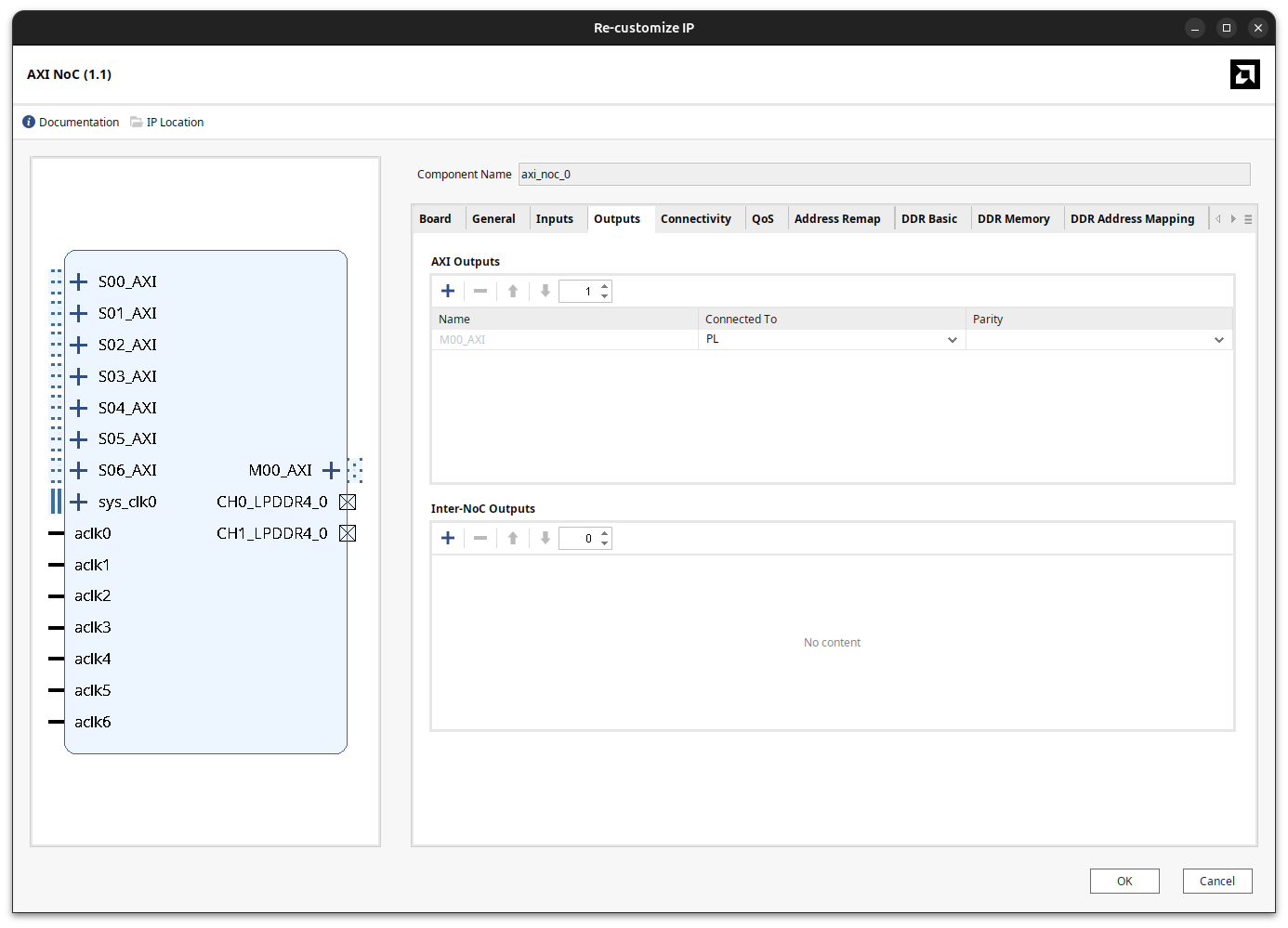
Adding the ports is not enough, because the NoC only routes the paths you explicitly declare in the Connectivity tab. For the master port, the traffic goes from the PS to the PL, so M00_AXI has to be connected to at least one of the slave ports that come from the CIPS, in this case S00_AXI, which is driven by FPD_CCI_NOC_0. This detail matters: the APU running Linux reaches the PL through the FPD_CCI_NOC masters, so if the DMA register bank is only visible from another master (the RPU through LPD_AXI_NOC, for example), Linux will never see the peripheral and no device-tree node will be generated for it. For the new slave port, the one in charge of moving data between the PL and the DDR, S06_AXI has to be connected to at least one of the memory controller ports, in this case MC Port 1.
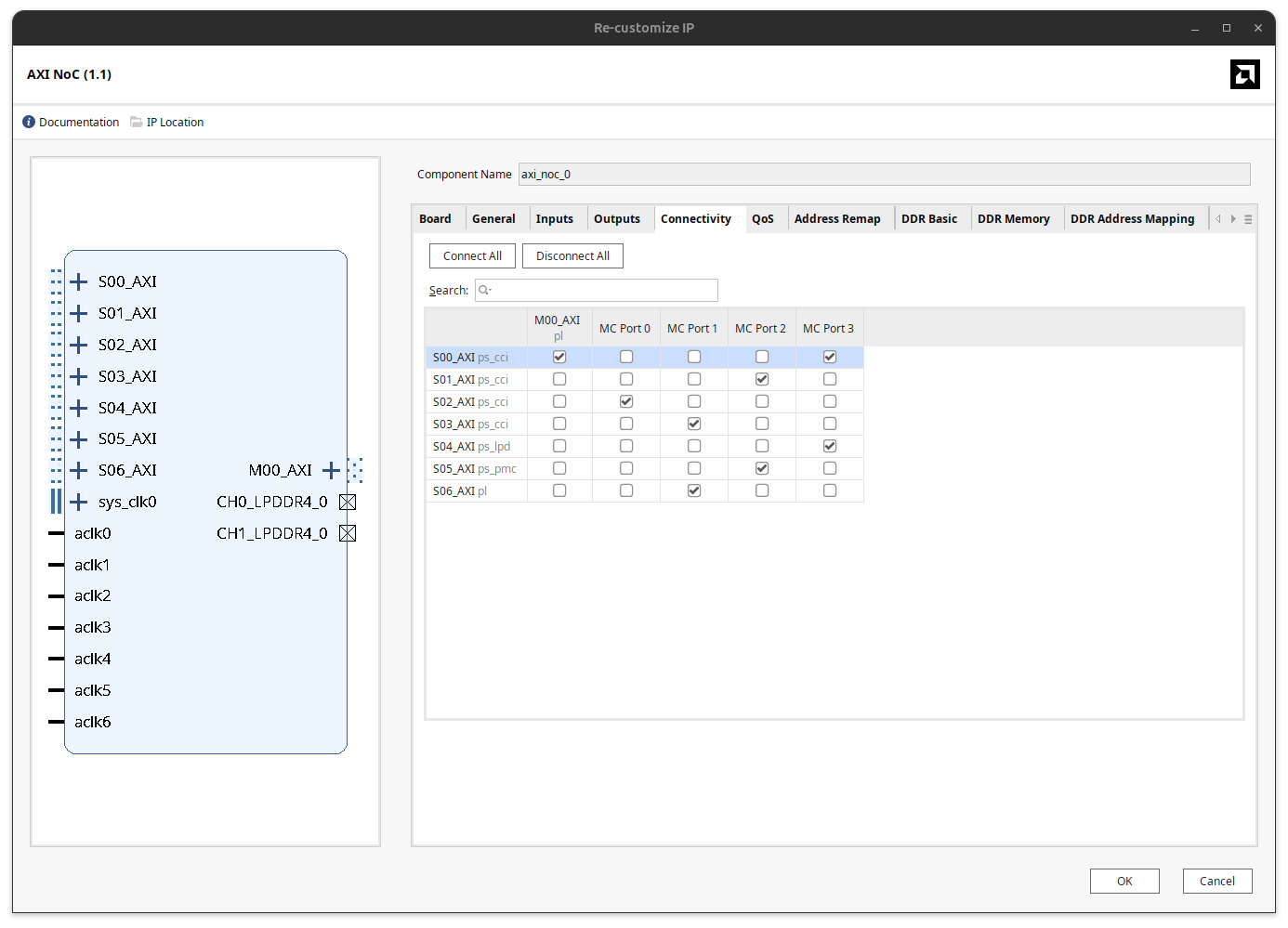
With this, the AXI NoC is ready to accept data from the PL that will end up in the DDR memory. In the Address Editor, the AXI DMA register bank lands at 0x201_0000_0000 in the FPD_CCI_NOC_0 address space, which is a high, 44-bit address. Keep it in mind, because it is one of the reasons I moved to UIO later.
The AXI DMA and the xFFT
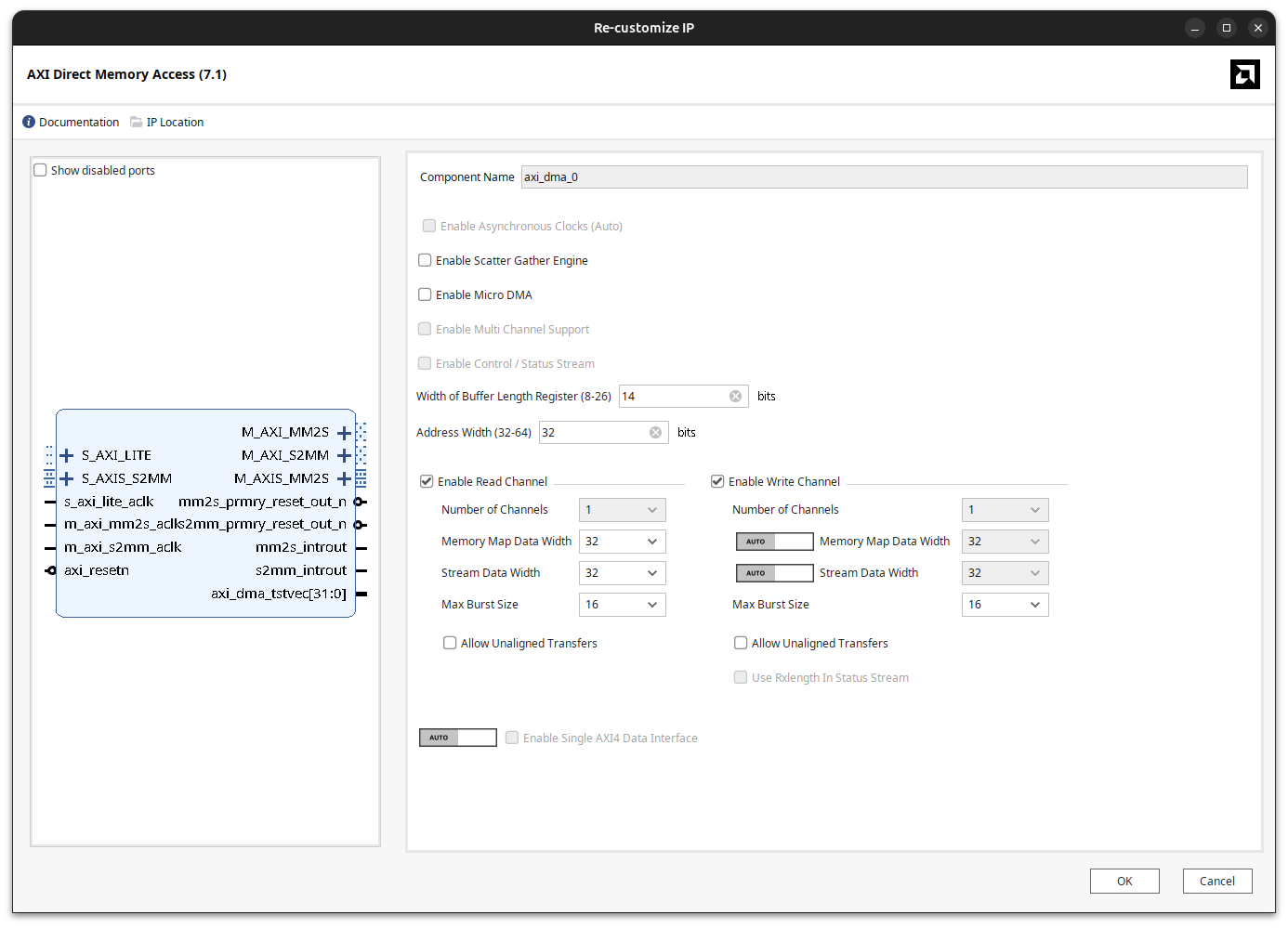
The AXI DMA configuration is very straightforward. I keep the Scatter Gather Engine unchecked (simple direct register mode; scatter-gather deserves its own article, because in some designs it really makes the difference), and I enable both the read and the write channels. The memory map data width, the stream data width and the maximum burst size are configured to 32 in both channels.
Configuring the xFFT
The application for this demo is a spectrum analyzer. The PS has a signal, sends it to the PL, the PL computes the FFT and the result comes back to the PS as the values of the different bins. The FFT is computed by the AMD xFFT IP (Fast Fourier Transform 9.1), an IP I have used several times on this blog, for example in FFT algorithm using an FPGA and XDMA.
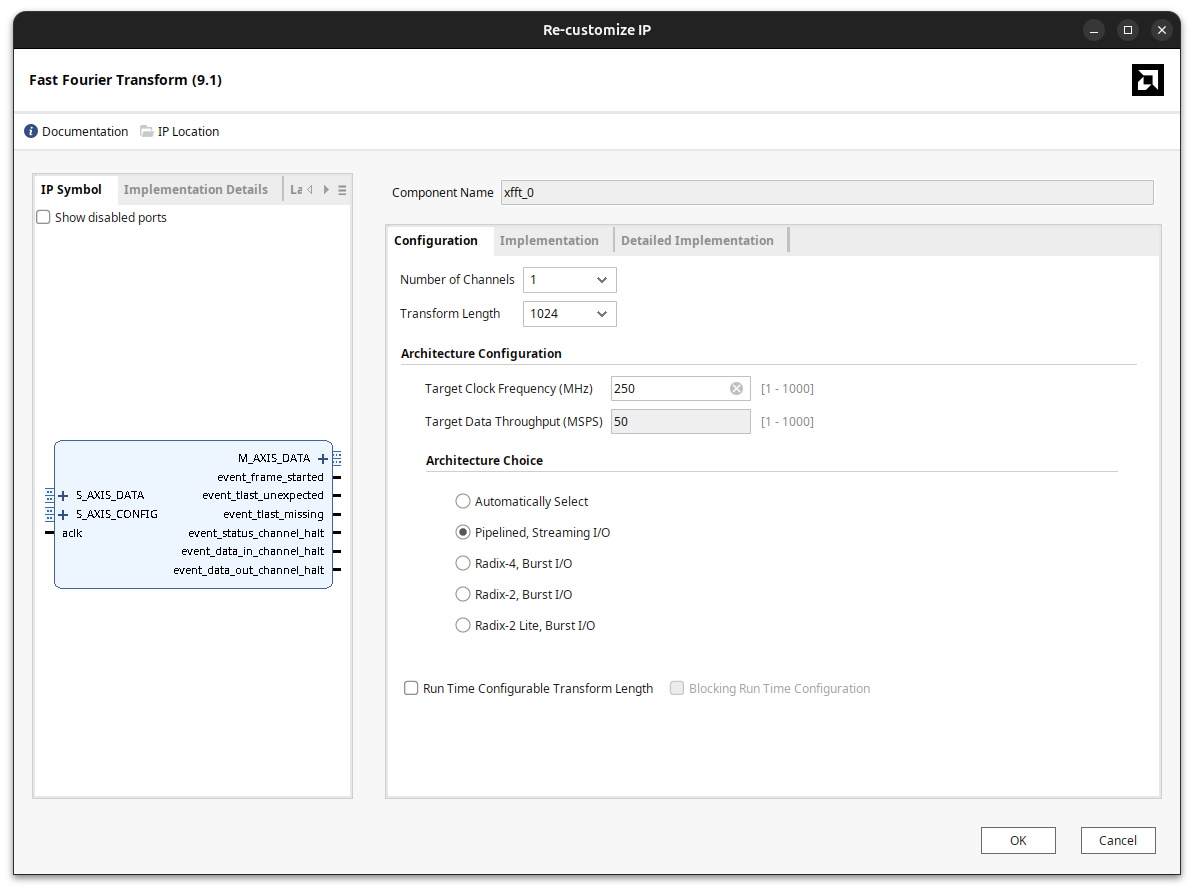
In the first tab we configure the internal architecture of the block. The different architectures give different performance depending on how the data is going to be fed to the xFFT. In this case I selected Pipelined Streaming I/O, which accepts one sample per clock continuously, and a transform length of 1024 points. This tab also lets you set a target clock frequency, but this is not really a configuration of the hardware; it is only used by the GUI to compute the throughput and latency of the selected architecture.
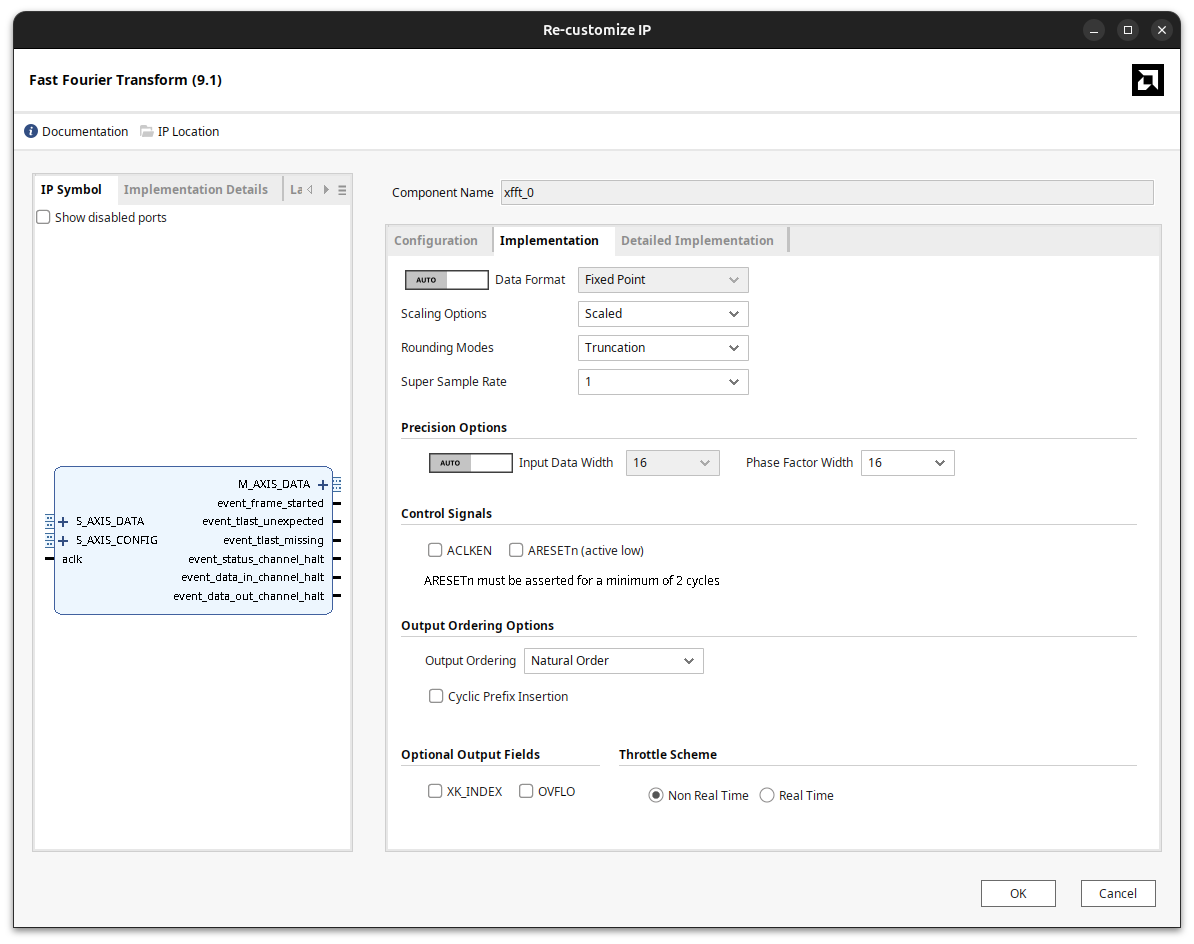
The second tab contains the implementation details. The data format is fixed point with 16-bit input and phase factors, and the scaling option is Scaled, which shifts the data inside the butterflies to avoid overflows (we will come back to this when reading the results). For the output ordering I selected Natural Order, and this one deserves a comment. Natural order is useful for demos and fast prototyping, because the bins come out in the order you would plot them. However, when I use this IP in a real project I usually select Bit/Digit Reversed Order. The reason is that the FFT algorithm does not produce its output in natural order; to deliver it that way the IP has to spend extra clock cycles and memory reordering the bins. That is fine if you want to show the data directly, but when latency matters and you know where each bin is, you get exactly the same information a bit earlier.
Connecting everything
Now it is time to connect everything. The AXI4-Stream interfaces of the xFFT are connected to the stream ports of the AXI DMA: M_AXIS_MM2S of the DMA goes to S_AXIS_DATA of the FFT, and M_AXIS_DATA of the FFT goes back to S_AXIS_S2MM. The FFT also has a configuration stream, S_AXIS_CONFIG, that we are not going to use, so its s_axis_config_tvalid is tied to a constant 0. With no configuration words, the IP works with the values it takes after reset: forward transform, the maximum point size and the default scaling schedule.
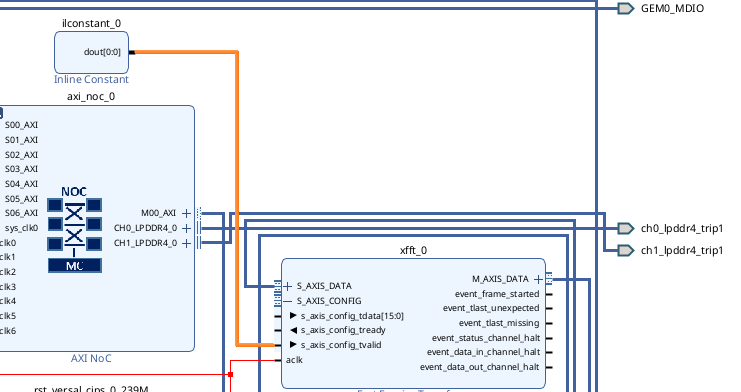
Finally, two AXI SmartConnect IPs complete the design. The first one merges the M_AXI_MM2S and M_AXI_S2MM memory-mapped masters of the DMA into the new S06_AXI slave port of the NoC, so both channels share the path to the DDR. The second one connects M00_AXI of the NoC to the S_AXI_LITE port that configures the AXI DMA. All the PL logic is clocked from pl0_ref_clk, with a Processor System Reset generating the synchronous resets.
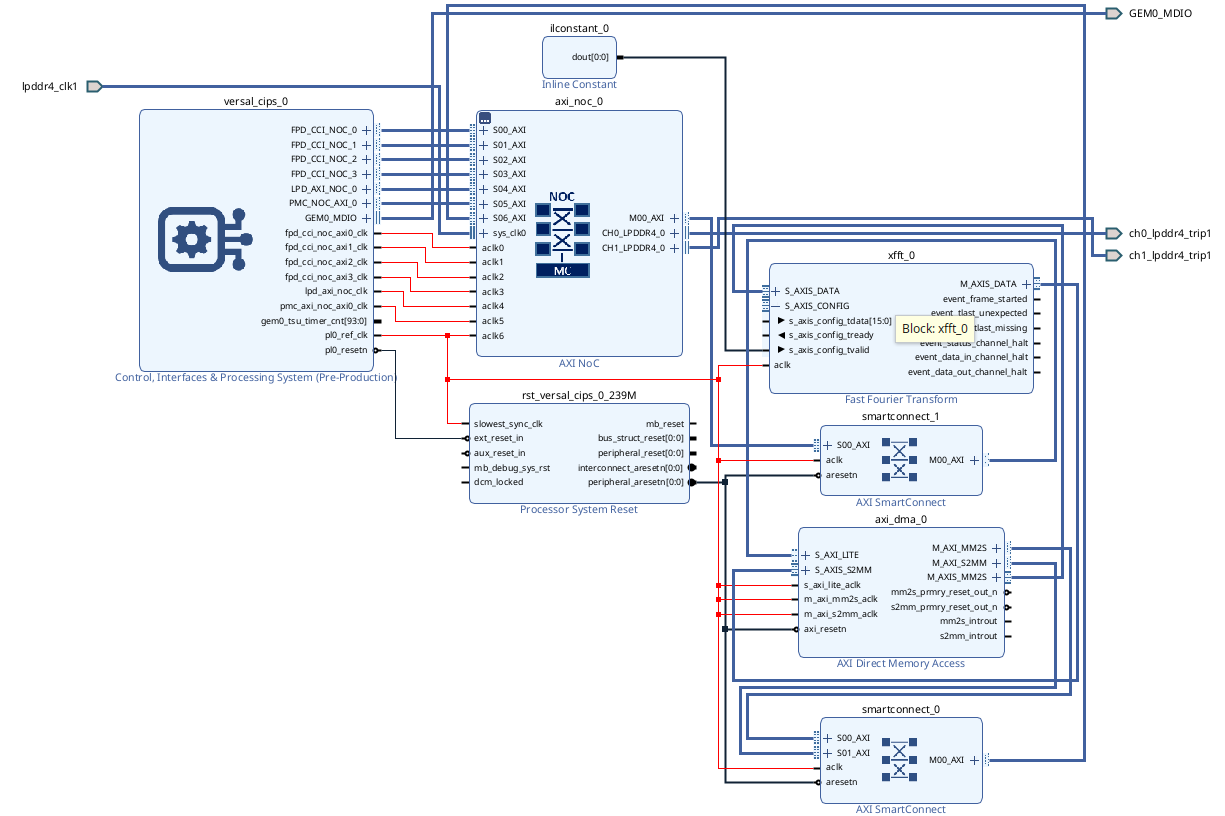
After generating the bitstream, the XSA is exported to be used in PetaLinux.
Building the PetaLinux image
The process for creating the PetaLinux project is the same as in my previous Versal article, starting from the BSP provided by iWave. First, source the PetaLinux 2025.1 environment:
source /media/pablo/data/amd/PetaLinux/2025.1/settings.sh
Then create the project from the BSP and rename the folder to os/, which is the name I use in all my projects:
petalinux-create --type project -s /media/pablo/data/bsp/iwg57m-R20-SD20-REL0.2-base.bsp --name versal-accel
mv versal-accel/ os/
Device tree changes
All the device tree changes go into os/project-spec/meta-user/recipes-bsp/device-tree/files/system-user.dtsi. When we use the default BSP for this board, the first change is the root filesystem, which has to point to the second partition of the SD card, /dev/mmcblk1p2. In the same bootargs I also add uio_pdrv_genirq.of_id=generic-uio, which tells the UIO platform driver which compatible string it has to match. Without this parameter, the generic-uio node we will define later is simply ignored.
chosen {
	bootargs = "earlycon console=ttyAMA0,115200 clk_ignore_unused root=/dev/mmcblk1p2 rw rootwait net.ifnames=0 uio_pdrv_genirq.of_id=generic-uio";
};
The DMA needs two buffers in DDR, one for the data that goes to the FFT and another one for the result, and Linux must not use those ranges for anything else. They are declared as reserved memory. I placed two buffers of 1 MB at the top of the low 2 GB window. Since the AXI DMA is configured with 32-bit addresses, both buffers have to stay inside the 32-bit address space so the DMA can reach them, and the no-map property keeps the kernel away from them.
reserved-memory {
	#address-cells = <2>;
	#size-cells = <2>;
	ranges;

	/*
	 * dma_tx: input data streamed out through MM2S into the FFT.
	 * dma_rx: FFT result written back through S2MM.
	 */
	dma_tx_reserved: dma_tx_buffer@7fe00000 {
		compatible = "shared-dma-pool";
		no-map;
		reg = <0x0 0x7fe00000 0x0 0x00100000>;
	};

	dma_rx_reserved: dma_rx_buffer@7ff00000 {
		compatible = "shared-dma-pool";
		no-map;
		reg = <0x0 0x7ff00000 0x0 0x00100000>;
	};
};
The next change is the most important one. By default, the device tree generator binds the AXI DMA to the in-kernel xilinx_dma driver, which exposes it through the Linux DMA engine API, not something you can poke from Python. Overriding its compatible with generic-uio prevents the kernel driver from claiming it, and the UIO driver exposes the register bank as /dev/uioN. This is the real advantage on Versal: remember that the register bank is at 0x201_0000_0000. With UIO, the kernel maps it for us and the Python driver just opens /dev/uio0 and maps it from offset 0, without hardcoding any physical address.
&axi_dma_0 {
	compatible = "generic-uio";
	linux,uio-name = "axidma";
	memory-region = <&dma_tx_reserved>, <&dma_rx_reserved>;
};
Both reserved regions are referenced from the DMA node, index 0 for the TX buffer (MM2S source) and index 1 for the RX buffer (S2MM destination). The kernel needs CONFIG_UIO and CONFIG_UIO_PDRV_GENIRQ enabled for all of this to work.
The last change is enabling the SD card controller, adding status = "okay"; to the sdhci1 node:
&sdhci1 {
status = "okay";
clock-frequency = <200000000>;
xlnx,has-cd = <0x1>;
xlnx,mio-bank = <1>;
bus-width = <4>;
vqmmc-supply = <®_ssd_vqmmc>;
};
Python packages
The driver and the notebook need Python, mmap, NumPy and Matplotlib on the target, and I want Jupyter to work interactively from my host. The packages are added to os/project-spec/meta-user/conf/user-rootfsconfig:
CONFIG_packagegroup-python3-jupyter
CONFIG_python3-mmap
CONFIG_python3-matplotlib
CONFIG_python3-numpy
And then enabled in the rootfs configuration, under user packages:
petalinux-config -c rootfs
user packages --->
    [*] packagegroup-python3-jupyter
    [*] python3-matplotlib
    [*] python3-mmap
    [*] python3-numpy
Building and checking the image
Now the image can be built and packaged. Since the root filesystem lives on the SD card, I generate the wic image that contains both partitions:
petalinux-build
petalinux-package boot --u-boot --force
petalinux-package wic
Once the board boots from the SD card, the first thing to verify is that the reserved memory has been correctly allocated. The kernel log shows both regions as nomap non-reusable, exactly where we declared them:
root@versal-iwg57m:~# dmesg | grep reserved
[    0.000000] OF: reserved mem: initialized node dma_tx_buffer@7fe00000, compatible id shared-dma-pool
[    0.000000] OF: reserved mem: 0x000000007fe00000..0x000000007fefffff (1024 KiB) nomap non-reusable dma_tx_buffer@7fe00000
[    0.000000] OF: reserved mem: initialized node dma_rx_buffer@7ff00000, compatible id shared-dma-pool
[    0.000000] OF: reserved mem: 0x000000007ff00000..0x000000007fffffff (1024 KiB) nomap non-reusable dma_rx_buffer@7ff00000
Then, check that the UIO device exists and that it is our DMA:
root@versal-iwg57m:~# ls /dev | grep uio
uio0
root@versal-iwg57m:~# cat /sys/class/uio/uio*/name
axidma
The image ships with Python 3.12.9, which is the version I used for everything that follows.
Driving the DMA from Python
The pyxdma repository contains two variants of the driver with the same API. pyxdma.py maps the DMA registers through /dev/mem and needs the physical base address, while pyxdma_uio.py maps them through /dev/uioN. In both cases the DDR buffers are mapped through /dev/mem at their physical addresses, since UIO does not expose them, so the driver has to run as root. Completion is detected by polling the S2MM status register; there is no interrupt support yet. For this design I am using the UIO variant. The module is a single file, so it can be copied to the board, or installed in the image with the Yocto layer included in the repository.
To work interactively, I launch a Jupyter server on the board, headless and listening on all interfaces, and connect from the browser of my host:
sudo jupyter-notebook --allow-root --no-browser --ip=0.0.0.0
The notebook starts by importing the driver, NumPy and Matplotlib, and creating the AxiDma object. The only difference with the /dev/mem version is the constructor, where base_address is replaced by uio_dev. The source and destination addresses are the reserved buffers of the device tree.
from pyxdma_uio import *
import numpy as np
import matplotlib.pyplot as plt

# Init AXI DMA class
dma = AxiDma(
    uio_dev="/dev/uio0",
    size=0x10000,             # control block size
    src_address=0x7FE00000,   # reserved DDR buffer read by MM2S
    dst_address=0x7FF00000,   # reserved DDR buffer written by S2MM
    buffer_size=0x00100000,   # size mapped for each DDR buffer
)
The test signal is a sum of four tones over exactly one period of the 1024 samples: a fundamental of amplitude 0.5 in bin 1, and three smaller components of 0.1, 0.05 and 0.02 in bins 16, 18 and 34.
# Create signal
n_samples = 1024 # defined in the xFFT IP

angle = np.linspace(0, 2*np.pi, n_samples, endpoint=True)

signal = 0.5*np.sin(angle) + 0.1*np.cos(16*angle) + 0.05*np.sin(18*angle+0.87) + 0.02*np.sin(34*angle+0.1)

plt.plot(signal)
plt.grid()
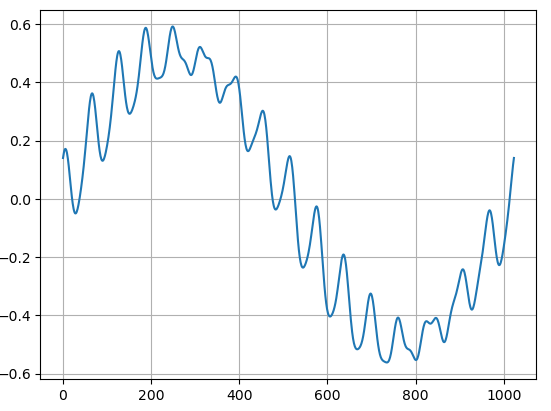
The xFFT expects complex samples on a 32-bit word, with the real part on the 16 LSBs and the imaginary part on the 16 MSBs, both in Q15. Since our signal is real, the imaginary part is zero, and packing it is just scaling, saturating and reinterpreting the int16 as an unsigned value:
# Package signal as complex Q15 word = {Im[31:16]=0, Re[15:0]}
signal_int = np.clip(np.round(signal * 32767), -32768, 32767).astype(np.int16)
tx_words = signal_int.astype(np.uint16).astype(np.uint32).tolist()   # Im = 0
Sending the data is three calls. configure() resets and halts both channels, enables the interrupt flags and programs the source and destination addresses; run() starts both channels; and transfer() writes the words to the source buffer, arms the S2MM channel before triggering the MM2S by writing both length registers, polls the status until the S2MM finishes, and returns the words written by the FFT into the destination buffer.
# Configure DMA and send data
dma.configure()
dma.run()
rx_words = dma.transfer(tx_words, timeout=2.0)
Arming the receiver first is not a detail. If the MM2S starts pushing samples before the S2MM has a length programmed, the FFT output stalls on tready, and depending on the design you either lose data or the pipeline just stays blocked waiting for someone to read it.
Reading the spectrum
The received words have the same format as the input, so the real and imaginary parts are split, reinterpreted as signed 16-bit values, and the magnitude of each bin is computed. The last line converts from Q15 back to floating point and applies a factor of two that I will explain in a moment.
# Split samples into Re and Im
signal_fft = np.array(rx_words, dtype=np.uint32)

signal_re = (signal_fft & 0xFFFF).astype(np.int16)
signal_im = ((signal_fft >> 16) & 0xFFFF).astype(np.int16)

mag = np.abs(signal_re.astype(float) + 1j * signal_im.astype(float))

mag_fp = mag*2/32767

# Plot FFT
plt.stem(mag_fp)
plt.grid()
plt.xlim([0, 40])
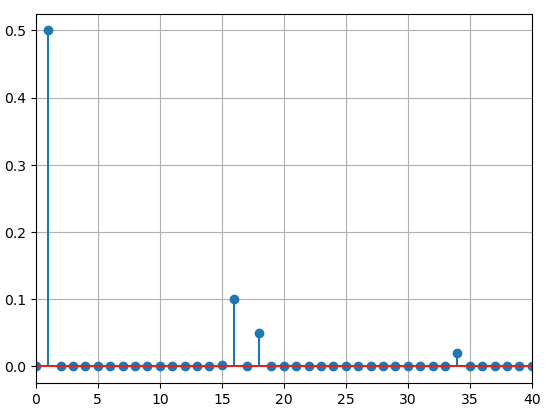
The four tones appear exactly in bins 1, 16, 18 and 34, with amplitudes 0.5, 0.1, 0.05 and 0.02, the same values we used to generate the signal. One detail is worth highlighting here: the familiar 2/N normalization factor of the FFT is nowhere in the code, and the amplitudes come out right without dividing by 1024. The reason is the Scaled arithmetic selected in the IP, combined with the default scaling schedule. In scaled mode, the datapath is shifted to the right after each stage according to the scaling schedule SCALE_SCH, to keep the result inside the fixed 16-bit output width. Since we never send a configuration word, the IP uses the value it takes after reset, which according to PG109 is a scaling of \(1/N\). For the Pipelined Streaming I/O architecture and a size that is a power of 4, like \(1024 = 4^5\), the default schedule is [10 10 10 10 10]: five radix-4 stages, each one shifting 2 bits. In total that is a division by \(2^{10}\), that is, by \(N\), so the core delivers
directly. The \(1/N\) part of the classic \(2/N\) normalization has already been applied inside the FFT. What remains is only the factor of two that accounts for a real tone splitting its energy between the positive and the negative frequency bins: a tone of amplitude \(A\) appears in its bin as \(A/2\), and the *2 in the code restores it. If you only care about the relative magnitude of the harmonics, even that factor is unnecessary.
This built-in scaling is deliberately conservative. It guarantees that no input can overflow the pipeline, at the cost of losing a few LSBs of resolution in the small components. That is exactly the trade-off that allows the stream to stay at a constant 16 bits from the DMA, through the transform, and back to the DDR. If you need more dynamic range, the options are an unscaled (or block floating point) configuration with a wider output, or a custom scaling schedule sent through the S_AXIS_CONFIG channel we have tied to zero.
Conclusions
On Versal, adding a DMA is not more complicated than on Zynq UltraScale+, but it is different because of the NoC structure, which actually gives us more flexibility in how data flows. The data path to the DDR is now a NoC slave port that has to be explicitly routed to a memory controller, and the register bank is reached through a NoC master port that has to be visible from the APU. Once these two connections are clear, the AXI DMA and the xFFT are configured exactly as in any other AMD device.
The speed we can reach with Versal and the DMA is crazy. We are talking about 128 Gb/s (512 bits × 250 MHz). Actually, the limitation here is usually not the Versal device itself but the speed of the DDR interface (which can be solved with the HBM devices). There is no doubt that these devices are designed to read large amounts of data at very high speeds, work with them directly on the FPGA side and then, once the data is processed, send it to the processor. This is the way you have to work, not only with these devices, but with all SoCs.
The code of this article is uploaded to Github, and the driver is available in its own repository, pyxdma.