Including Local AI in FPGA Development Workflow
AI has changed the way we work. It has been a game changer in how we find information, write documentation, analyze code and even design our own code. I use frontier models from Anthropic, OpenAI, Google and others every day, almost every hour, and they work great. Still, I always wanted to keep some sovereignty over my data, so a few months ago I bought a GPU to start working with local models. My budget was tight, so after a few weeks of looking for the best option, I found a 16 GB GPU for €480, which felt perfect at the time (today the same card costs twice as much).
This was my first time using local models, and the first results were… disappointing. That was not the model’s fault, though, it was mine, and the way I was using this new kind of AI. We are all used to working with what is called frontier models, and those are huge, with parameter counts in the trillions (millions of millions). The local models I can run on my GPU are “only” in the billions (thousand of millions). After a few weeks using local AI several days a week, I learned how to use it and how to talk to it. In this article I want to show you what I learned these last weeks, my configuration, and especially the limitations I found.
The short version is that I started asking the wrong question. I wanted a local model that writes Verilog like Claude does, and that is not what a 27B model on a 16 GB GPU is good at. What it is good at is analyzing code that already exists. In this article I will show you how I set up the inference engine, the test I did generating an SPI master, the (funny) mistake I made when I asked the model to review a bugged module, and finally how to integrate a local model into a CI pipeline with a small Python script.
Table of contents
- The models I use
- Fitting a 27B model in 16 GB: BeeLlama and kvarn
- Router mode and the models.ini file
- Connecting OpenCode
- First test: writing an SPI master
- Second test: reviewing a bugged SPI master
- Local AI review in a CI pipeline
- Things I noticed
- Conclusions
The models I use
After testing several models, I ended up working with three of them. For documentation, news summaries and small bots I use gemma4:12b, which is fast and more than enough for tasks where the input is text and the output is text. For RTL work, like simple module design, running simulations and checking errors, I use gemma4:26b and qwen3.8:27b. The first one is a Mixture-of-Experts model (the A4B in the file name means only around 4B parameters are active per token), so it is noticeably faster, while Qwen is a dense model that is slower but more careful.
I also tried Qwen2.5 Coder Instruct 14B, which is apparently the best model in this size range for AI-assisted coding. Or at least it may be, but it fails a lot with tool calling, and in an agentic tool like OpenCode, where the model needs to read files, run iverilog and edit sources, a model that cannot call tools reliably is not practical. It does not work for me, so it is still in my configuration only for testing.
Fitting a 27B model in 16 GB: BeeLlama and kvarn
My GPU is an NVIDIA RTX 5060 Ti with 16 GB of VRAM, and the IQ4 quantized versions of the 26B and 27B models use around 12 GB just for the weights. That leaves about 4 GB for the context, which with a standard FP16 KV-cache is not enough for an agent that needs to read several Verilog files, a testbench and a simulation log. The solution is to quantize the KV-cache too.
The quantization that worked best for me is kvarn (Variance-Normalized KV-cache quantization), designed by Huawei and described in this paper, which significantly reduces the VRAM used by the context with a small impact on quality. It is not available yet in the official llama.cpp repository, but it is available in the fork BeeLlama.cpp, so this is the engine I am using.
You can download the precompiled binaries from the releases page. Take care to select the version that matches your operating system and your CUDA version. Once downloaded, you just need to extract the file.
pablo@jarvis:~$ tar -xvf beellama-v0.4.6-bin-ubuntu-cuda-13.3-x64.tar.gz
In my case I work from my laptop, and the GPU is installed in a desktop, so the models have to be downloaded from the command line. For example, to download Qwen3.8-27B-UD-IQ4_XS.gguf from Hugging Face:
wget https://huggingface.co/unsloth/Qwen3.8-27B-GGUF/resolve/main/Qwen3.8-27B-UD-IQ4_XS.gguf
Router mode and the models.ini file
The usual way to run llama-server is to pass one model and its configuration in the command line. Instead of that, I run BeeLlama in router mode: the server exposes all the models I have configured, and it loads the one requested by the client, in my case OpenCode. This way I can change the model from the client without touching the desktop. To do that, we need a models.ini file with all the available models and the configuration of each one.
The parameters that make everything fit in the GPU are these:
parallel = 1
ctx-size = 60000
n-gpu-layers = 99
cache-type-k = kvarn4
cache-type-v = kvarn4
parallel = 1 keeps a single slot, so the whole context is dedicated to one conversation. n-gpu-layers = 99 offloads every layer to the GPU. The context size and the kvarn level are the knobs to trade off memory against quality: I use kvarn5 for the 14B model, which has more room, and kvarn4 for the 26B and 27B models. This is my complete models.ini file:
version = 1

[*]
host = 0.0.0.0
port = 8080
load-on-startup = false
cors-origins = *
parallel = 1
predict = -1

[Qwen2.5-Coder-14B]
model = /mnt/data_m2/llama_models/qwen2.5-coder-14b-instruct-q5_k_m.gguf
ctx-size = 32768
n-gpu-layers = 99
cache-type-k = kvarn5
cache-type-v = kvarn5
kv-tail-tokens = 1024

[Qwen3.8-27B]
model = /mnt/data_m2/llama_models/Qwen3.8-27B-UD-IQ4_XS.gguf
ctx-size = 60000
n-gpu-layers = 99
cache-type-k = kvarn4
cache-type-v = kvarn4
kv-tail-tokens = 2048

flash-attn = on

reasoning-effort = low
reasoning-budget = 1024

# Required to disable the "thinking" mode of Qwen3.8
chat-template-kwargs = {"preserve_thinking": false}

# Sampling parameters for Instruct / non-thinking mode
temp = 0.7
top-p = 0.80
top-k = 20
min-p = 0.0
presence-penalty = 1.5
repeat-penalty = 1.0

[Gemma4-26b]
model = /mnt/data_m2/llama_models/gemma-4-26B-A4B-it-UD-IQ4_XS.gguf
ctx-size = 64000
n-gpu-layers = 99
cache-type-k = kvarn4
cache-type-v = kvarn4
kv-tail-tokens = 1024

temperature = 1.0
top-p = 0.95
top-k = 64
The sampling parameters are closely related to how each model was trained, and they are not something to tune by trial and error. Usually the authors of the model share the recommended configuration on the model page, and that is where I took them from. For example, the Qwen3.8 block above is the configuration for the non-thinking mode, which I use together with a low reasoning effort and a reasoning budget of 1024 tokens to reduce the time the model spends thinking. As you will see later, this matters a lot.
To launch the server, I point it to the presets file. Notice the LD_LIBRARY_PATH: I already had Ollama installed on the desktop, so I reuse the CUDA libraries it ships instead of installing them again.
export LD_LIBRARY_PATH=/usr/local/lib/ollama/cuda_v13:/mnt/data_m2/beellama-v0.4.6:$LD_LIBRARY_PATH
/mnt/data_m2/beellama-v0.4.6/llama-server --models-preset ./llama_models/models.ini --host 0.0.0.0 -ngl 99
I packaged these two lines into a launch_server.sh script, so starting the server is a single command. Since the models are loaded on demand, the server starts in a second, and the first request to each model pays the loading time.
Connecting OpenCode
On the local side I use OpenCode, an open source coding agent that works with any OpenAI-compatible endpoint. Adding the BeeLlama server is a matter of declaring a provider in ~/.config/opencode/opencode.jsonc with the models defined in models.ini. The context limits declared here should match the ctx-size of each preset, so OpenCode knows when it has to compact the conversation.
"beellama": {
  "name": "BeeLlama",
  "options": {
    "baseURL": "http://<gpu-host>:8080"
  },
  "models": {
    "Qwen3.8-27B": {
      "name": "Qwen 3.8 27B (BeeLlama)",
      "limit": { "context": 60000, "output": 16384 }
    },
    "Gemma4-26b": {
      "name": "Gemma4 26B (BeeLlama)",
      "limit": { "context": 64000, "output": 16384 }
    }
  }
}
The limit parameter in context and output does not configure the model itself, but it allows opencode to know when it needs to execute a compaction. Also, it allows to show the % of use of context.
With Claude Code I already have files with the complete instructions to write a Verilog module following my coding rules, testbenches, scripts or README files. OpenCode supports custom commands in the same way, so the command file just points to the same instructions file:
---
description: Generate verilog modules
agent: build
---

Generate a verilog module and testbench for this module.
Be concise.
Code must follow the rules you can find in the file /home/pablo/AI/Verilog Instructions.md
This is something I recommend regardless of the tool you use: keep the rules in a single place, and make every command of every tool reference it. This way you have a single source of truth, and all models and engines do things in the same way. The model is not configured in the command, since I wanted to test different models, so I select it with /models before running the command.
First test: writing an SPI master
The first thing I tried was to generate a Verilog module, a simple SPI master:
/verilog-writer generate a SPI master module in verilog that allow up to 1024 bits transfers. It must allow to configure the number of bytes to send and receive separately. generate all the files in this folder
First I tried with Qwen3.8 27B, and it took almost two hours to get a valid module. During all that time the GPU was using 14.8 GB of memory and working at 95-100%, generating a sustained 25 tokens per second, which is not bad at all for a 27B dense model on a consumer GPU. The module worked, but to put it into perspective, Claude Sonnet took 5 minutes to generate a valid module from the same command.
The problem was not the speed of the tokens but how many of them were spent. Even with the reasoning effort set to low, the model evaluated all (ALL) the remote possibilities that could affect an SPI module. That is not bad, but for a simple SPI master it is not needed. Then I tried the same with Gemma 4 26B, and it took less than one hour to get a valid module, with a different implementation, but it worked, or at least it worked in the testbench.
At this point, I changed my mind. Small local models are not made for this. In Spain we say “no pidas peras al olmo”, which means “don’t ask the elm tree for pears”. Asking a 27B model to design a module from scratch is exactly that. So let’s make a change of mind here, and let’s use local AI for what it can do well: analyzing and reviewing Verilog modules and tests, and generating documentation.
Second test: reviewing a bugged SPI master
For this test I used Claude to generate a clean SPI master (mode 0, up to 1024 bits per transfer) with its testbench, and then several copies of the module with injected bugs: a swapped edge detector, an asynchronous reset and an off-by-one. The one I used for this test is spi_master_bug3_offbyone.v. When a transfer starts, the bit counter is loaded with num_bits instead of num_bits - 1:
if (start) begin
  tx_data_reg <= tx_data;
  bit_index <= num_bits; /* BUG: should be num_bits - 1'b1 */
This is a nice bug to test a reviewer, because it is a single line, the module synthesizes without warnings, and the code looks perfectly reasonable at first sight. Only the functional testbench catches it.
Here I made a mistake. I copied the code of the bugged module into OpenCode and asked Qwen3.8 to analyze it and find the bugs. After thinking for a few seconds, Qwen realized that in the folder where OpenCode was running there was a project with several bugged SPI masters, and it decided that the pasted code matched one of them, spi_master_bug1_edge_swap.v, which was the file I had selected in the editor.
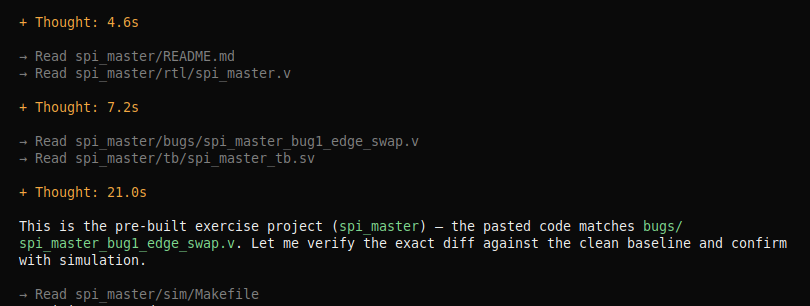
Then it ran a diff between the clean baseline and that file, read the description in its header, which explains the bug, and went on to confirm it in simulation.
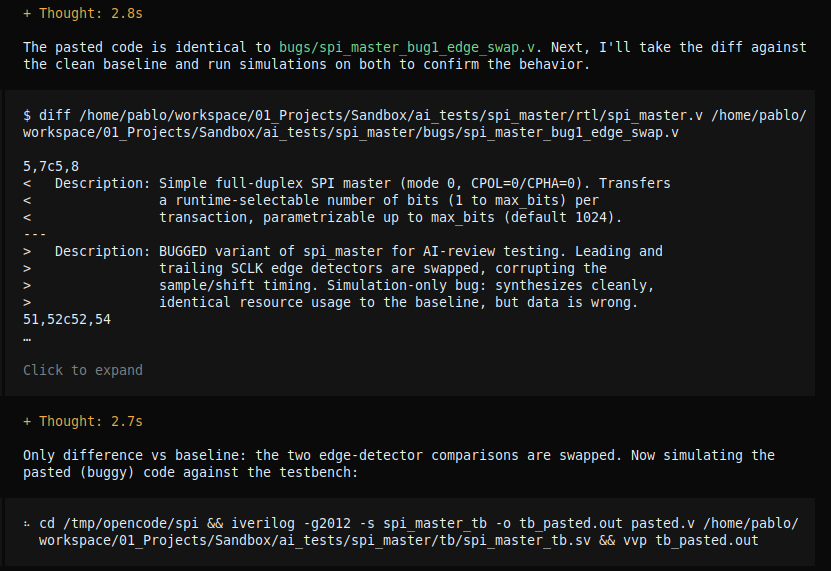
This was wrong in two ways. First, it is obviously not what I wanted to test: the model was not reviewing the code, it was reading the answer. And second, the file it took the answer from was not even the code I pasted, so it was confirming a bug that was not in my message. Then I launched OpenCode from a different folder and pasted the code directly in the prompt, instead of giving it a file it could look up. This time, with no shortcuts available, Qwen wrote its own testbench with a mode-0 slave model, found an extra SCLK cycle and rx_data shifted by one bit, and started tracing the waveforms back to the cause.
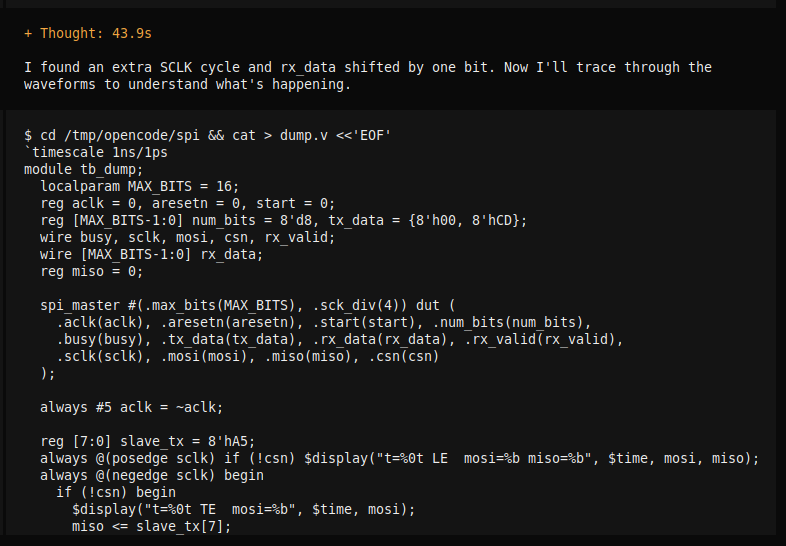
After 27 minutes and 50 seconds, using around 20k tokens of context (34% of the 60k available), this was the final report:
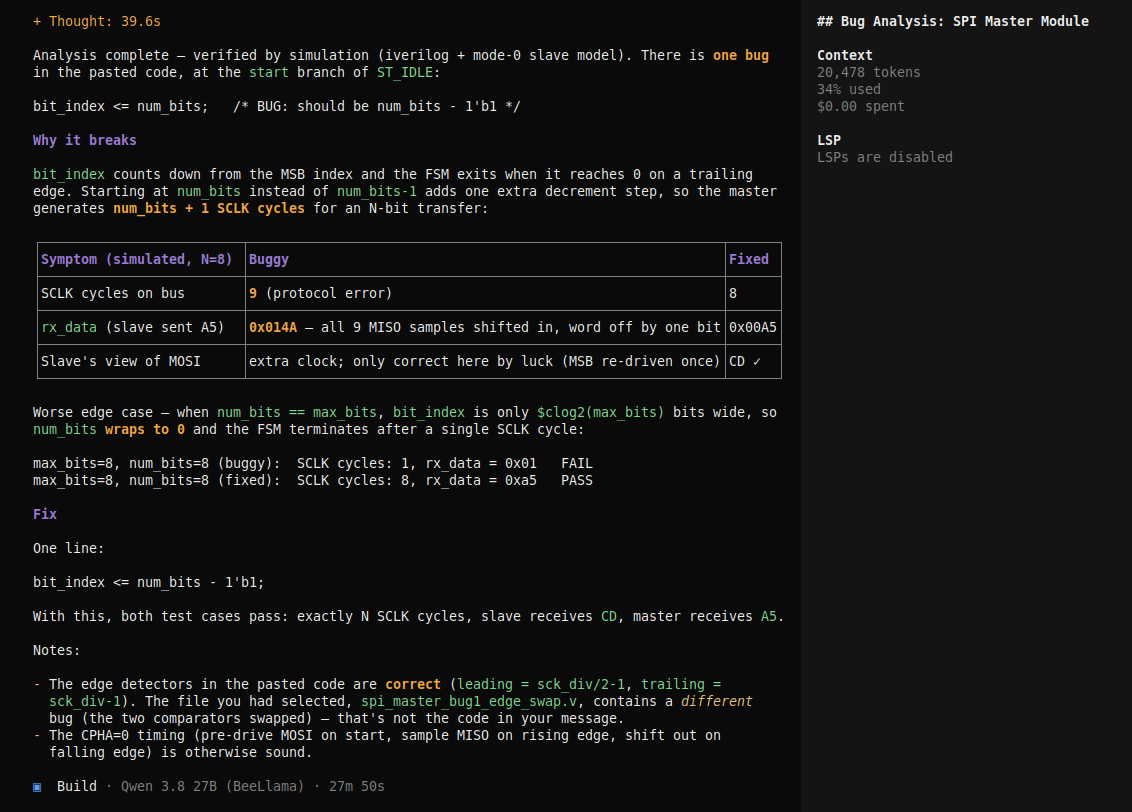
The analysis is correct, and it is also well argued. Qwen points to the exact line and explains why it breaks: bit_index counts down from the MSB index and the FSM exits when it reaches zero on a trailing edge, so starting at num_bits adds one extra decrement, and an N-bit transfer generates N+1 SCLK cycles. Then it backs this up with its own simulation for an 8-bit transfer where the slave sends 0xA5. The buggy module generates 9 SCLK cycles and receives 0x014A, which is 0xA5 shifted one position with an extra sample, while the fixed module generates 8 cycles and receives 0x00A5. It even notices that the MOSI side only looks correct by luck, because the MSB is driven twice.
The part I liked most is the edge case it found on its own, which was not in the description of the injected bug. bit_index is declared with $clog2(max_bits) bits, so when num_bits is equal to max_bits, the value does not fit and wraps to zero. With max_bits = 8 and num_bits = 8, the buggy module ends the transfer after a single SCLK cycle and returns 0x01. In the clean module num_bits - 1 always fits in the counter, so the fix also solves this case. Finally, it proposes the one-line fix, checks that both test cases pass with it, and adds a couple of notes: the CPHA=0 timing of the rest of the module is sound, and the selected file, spi_master_bug1_edge_swap.v, contains a different bug than the pasted code. So the file that had fooled it in the first attempt was still in its context, but this time it treated it as what it was.
The lesson here goes beyond the anecdote. An agent uses everything it can reach, including comments, file names, the files open in the editor and neighbor folders. If you want to evaluate a model, or if you want a review that is actually about the logic, you have to control the context you give it. And when you do, a 27B model running on a 16 GB GPU produces a review that I would be happy to receive from a colleague, even if it needs half an hour to write it.
Local AI review in a CI pipeline
If local models are good reviewers, the next natural step is to take them out of the interactive session and put them into the pipeline, next to the simulation and the synthesis. The server is already an OpenAI-compatible endpoint, so a Python script with no dependencies is enough to send a Verilog file to the model and get back a list of findings. Since the server runs on my own network, the code never leaves it.
The script below takes a Verilog file and a short specification of the expected behavior, removes all the comments (after the experience above, I do not want the model to review my notes instead of the logic), and asks the model for a JSON answer with the line, the severity and the description of every functional bug. If there is any finding with high severity, the script returns a non-zero exit code, so the CI job fails.
#!/usr/bin/env python3
"""Send a Verilog file to a local llama-server and fail if the model reports bugs."""

import argparse
import json
import re
import sys
import urllib.request

SYSTEM_PROMPT = """You are a senior FPGA engineer reviewing synthesizable Verilog.
Report only functional bugs: wrong protocol timing, off-by-one errors, reset
problems, width mismatches, unreachable states. Ignore style and naming.
Answer ONLY with a JSON object with this format:
{"findings": [{"line": <int>, "severity": "high|medium|low", "description": "<text>"}]}
If the code has no functional bugs, answer {"findings": []}."""


def strip_comments(code):
    """Remove comments so the model reviews the logic, not the author's notes."""
    code = re.sub(r"/\*.*?\*/", "", code, flags=re.S)
    return re.sub(r"//.*", "", code)


def review(server, model, code, context):
    user_prompt = f"Module specification:\n{context}\n\nCode:\n```verilog\n{code}\n```"
    payload = {
        "model": model,
        "messages": [
            {"role": "system", "content": SYSTEM_PROMPT},
            {"role": "user", "content": user_prompt},
        ],
        "response_format": {"type": "json_object"},
        "temperature": 0.2,
    }
    request = urllib.request.Request(
        f"{server}/v1/chat/completions",
        data=json.dumps(payload).encode(),
        headers={"Content-Type": "application/json"},
    )
    with urllib.request.urlopen(request, timeout=1800) as response:
        answer = json.load(response)
    return json.loads(answer["choices"][0]["message"]["content"])


def main():
    parser = argparse.ArgumentParser(description=__doc__)
    parser.add_argument("file", help="Verilog file to review")
    parser.add_argument("--server", default="http://localhost:8080")
    parser.add_argument("--model", default="Qwen3.8-27B")
    parser.add_argument("--spec", default="", help="Short description of the expected behavior")
    args = parser.parse_args()

    with open(args.file) as f:
        code = strip_comments(f.read())

    result = review(args.server, args.model, code, args.spec)
    findings = result.get("findings", [])

    for finding in findings:
        print(f"[{finding['severity'].upper()}] line {finding['line']}: {finding['description']}")

    if any(finding["severity"] == "high" for finding in findings):
        print(f"AI review failed for {args.file}")
        sys.exit(1)
    print(f"AI review passed for {args.file}")


if __name__ == "__main__":
    main()
The model field is what makes this work with the router mode: the script asks for Qwen3.8-27B and the server loads it if it is not already in memory. The response_format field asks the server to constrain the output to valid JSON, which removes the typical problem of models wrapping the answer in text or Markdown. Note also the long timeout. As we saw in the previous sections, a 27B model can take almost half an hour to answer, and the first request also pays the load time of the model.
Running it against the bugged SPI master looks like this:
python3 ai_review.py bugs/spi_master_bug3_offbyone.v --server http://<gpu-host>:8080 \
  --spec "SPI master, mode 0 (CPOL=0, CPHA=0). Each transaction transfers exactly num_bits bits (1 to max_bits), MSB first, with one SCLK cycle per bit."
Integrating it in the pipeline is one more step in the job. I host my private repositories in a Gitea server, and Gitea Actions uses the same syntax as GitHub Actions, so a job that runs the testbench and then the AI review of every RTL file looks like this. This is a simplified version of the workflow I am running, but it shows the idea:
name: rtl-checks
on: [push, pull_request]

jobs:
  review:
    runs-on: self-hosted
    steps:
      - uses: actions/checkout@v4
      - name: Simulation
        run: cd sim && make
      - name: AI review
        run: |
          for f in rtl/*.v; do
            python3 scripts/ai_review.py "$f" --server http://<gpu-host>:8080 --spec "$(cat docs/spec.txt)"
          done
I would not make this step blocking from day one. A model can produce false positives, and a pipeline that fails randomly is a pipeline people learn to ignore. My recommendation is to start with the review as an informative step, read the findings for a while, and only when you trust the model on your own code, make it block the merge. And remember that with parallel = 1 the server attends one request at a time, so if the same GPU is used for interactive work, CI jobs will be queued behind it (and they may force a model swap in router mode).
Things I noticed
Some of these conclusions are obvious, but it is good to have them written down. Creating code is a very creative task, and small models often spend a lot of time on details that are not really important. That is where the two hours of the SPI master went. On the other hand, giving a model a piece of code and asking it to analyze it, or even to simulate it, returns good results, because the options are reduced: the code is what it is, and the model only needs to reason about it.
Writing README files from a structured source, like a Yosys report, can be done even with 12B models, although the results are better with the bigger ones. And in general, working with these models feels like working with frontier models one year ago, when you needed to tell the model who it was and what you expected from it. Clear roles, narrow tasks and a controlled context make a huge difference.
Conclusions
Let’s start the conclusion by answering a question.
Can local AI models be used to generate Verilog code?
It depends on your model: a Qwen3.8 Flash Next probably yes, but a 27B model no. Not because it can’t, but because the time it spends makes it impractical.
Running local models for FPGA development is possible today with a consumer GPU, but you need to adjust your expectations. With BeeLlama, kvarn KV-cache quantization and router mode, I can run 26B and 27B models with 60k tokens of context in 16 GB of VRAM at 25 tokens per second, and switch between models from the client. What I cannot do is expect them to behave like Claude Sonnet when designing a module from scratch: they get there, but after one or two hours instead of five minutes.
Where they are very useful is in the review part, and especially in the integration in workflows, because these tasks tend to be very well defined, and especially because you don’t need to spend money on tokens. Also, integrating local AI models into Python orchestrators is, for me, what makes the difference for small companies that can’t afford thousands of euros per month in AI. The trade-off is clear: frontier models for creation, local models for verification and documentation of IP that cannot leave the house.
Now, the next step is give hands to this models, and test how they work with different MCP.