

AI-assisted testbench Generation for FPGA Designs

I use AI every day, especially for documenting and learning. Last week I was testing an SPI slave and wondered how a testbench generated by AI would work. A few options came to mind: would a black-box test be better? A gray-box test? What about giving the AI all the code and asking it to generate a 100% coverage test set?
Let’s keep it simple: a black-box test with documented ports should be enough, especially if the module is as simple as an SPI slave. This slave is not complete, so it does not work properly—can you imagine the AI-generated testbench failing to catch the errors?
Here’s the module instantiation. It includes comments on the ports, which I expect will be enough for the AI.
module spi_slave_decoder (
  input wire aclk, // System clock
  input wire resetn, // Active low reset signal

  output reg [7:0] spi_data_in, // Received byte
  input wire [7:0] spi_data_out, // Byte to send
  output wire spi_data_in_valid, // Received byte data valid
  output wire spi_bus_idle, // indicates to decoder si bus is idle

  input wire spi_cs_n, // Chip Select (active low)
  input wire spi_mosi, // Master Out Slave In
  output reg spi_miso, // Master In Slave Out
  input wire spi_sck // Serial Clock
);
Previously, in my testbench, I created a task that sends data using an SPI interface. The idea is to be able of sending a command, and then a set of data bytes. This task sends the command and up to 4 data bytes.
task send_spi_command_data;
	input [7:0] command; // Command to be sent
	input [31:0] data; // Data to be sent
	input integer data_width; // Width of the data to be sent
	begin
		// Wait for the SPI interface to be ready
		@(negedge spi_sck);
		spi_cs_n = 1'b0; // Activate chip select (active low)
		spi_data_from_master = command; // Set the command to be sent

		// Send the command over SPI
		repeat(8) begin
			spi_mosi = spi_data_from_master[7]; // Send MSB first
			spi_data_from_master = {spi_data_from_master[6:0], 1'b0}; // Shift left
			@(negedge spi_sck);
		end

		spi_data_from_master = data; // Set the command to be sent
		// Send the data over SPI
		repeat(data_width) begin
			spi_mosi = spi_data_from_master[31]; // Send MSB first
			spi_data_from_master = {spi_data_from_master[30:0], 1'b0}; // Shift left
			@(negedge spi_sck);
		end

		// Deactivate chip select after sending the command and data
		@(posedge spi_sck);
		spi_cs_n = 1'b1; // Deactivate chip select
	end

endtask
Ideally, the AI will also generate a task and it will reuse the task for all the tests.
So, let’s start to make some requests to ChatGPT.
I have this module in verilog that implements an SPI slave.
module spi_slave_decoder (
input wire aclk, // System clock
input wire resetn, // Active low reset signal
output reg [7:0] spi_data_in, // Received byte
input wire [7:0] spi_data_out, // Byte to send
output wire spi_data_in_valid, // Received byte data valid
output wire spi_bus_idle, // indicates to decoder si bus is idle
input wire spi_cs_n, // Chip Select (active low)
input wire spi_mosi, // Master Out Slave In
output reg spi_miso, // Master In Slave Out
input wire spi_sck // Serial Clock
);
Generate a testbench for the module
The result is a testbench written in Verilog. As you can see, it generates a task that generate the SPI transfers, as I did in my testbench.
// SPI transfer task (CPOL=0, CPHA=0, MSB first)
task automatic spi_transfer_byte(
	input  [7:0] mosi_byte,
	output [7:0] miso_byte
);
	integer i;
	reg [7:0] miso_shift;
	begin
		miso_shift = 8'h00;

		// Assert chip select
		spi_cs_n = 1'b0;
		#10;

		for (i = 7; i >= 0; i = i - 1) begin
			// Change MOSI on falling edge / before rising edge
			spi_mosi = mosi_byte[i];
			#5;
			// Rising edge of SCK: slave samples MOSI, master samples MISO
			spi_sck = 1'b1;
			#2;
			miso_shift[i] = spi_miso;  // sample MISO
			#3;
			// Falling edge of SCK
			spi_sck = 1'b0;
			#5;
		end

		// Deassert chip select
		#10;
		spi_cs_n = 1'b1;

		miso_byte = miso_shift;
		#20; // allow DUT to process the received byte
	end
endtask
At this point, I have the testbench, and exactly when I started to create the script that calls iverilog to execute the test, I thought… WTF? I will ask to AI to generate all the scripts needed!
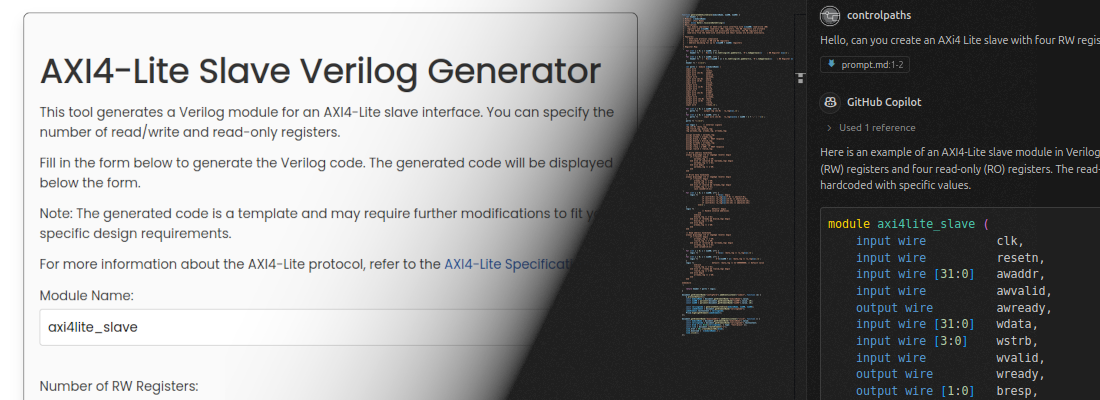
I need also the scripts that launch this testbench. This test is in a folder named ai_gen_test, and the spi_slave is one level up in a folder named v.
A minute later, I have a .sh file to launsh iverilog, a Makefile, and also another file needed for Modelsim.
project_root/
  v/
    spi_slave_decoder.v
  ai_gen_test/
    tb_spi_slave_decoder.v
    run_iverilog.sh
    Makefile
    modelsim.do   (optional)
Here you can see the run_iverilog.sh
#!/usr/bin/env bash
set -e

TOP=tb_spi_slave_decoder
OUT=simv

# Compile
iverilog -g2012 -o "$OUT" \
  ../v/spi_slave_decoder.v \
  tb_spi_slave_decoder.v

# Run
vvp "$OUT"
The instructions to make the .sh file executable
cd ai_gen_test
chmod +x run_iverilog.sh
./run_iverilog.sh
And the Makefile
SIM     := simv
VSRCS   := ../v/spi_slave_decoder.v tb_spi_slave_decoder.v
TOP     := tb_spi_slave_decoder

.PHONY: all compile run clean

all: run

compile:
	iverilog -g2012 -o $(SIM) $(VSRCS)

run: compile
	vvp $(SIM)

clean:
	rm -f $(SIM) *.vcd
The only that I have to do is execute the make command.
pablo@miercoles:~/work/cryptolite/rtl/ai_gen_test$ make
iverilog -g2012 -o simv ../v/spi_slave_decoder.v tb_spi_slave_decoder.v
vvp simv
[150000] Starting SPI transfer: MOSI=0xA5, expected MISO=0x3C
[310000] Completed transfer. Captured MISO=0x1e
[310000] Starting SPI transfer: MOSI=0x0F, expected MISO=0x5A
[470000] Completed transfer. Captured MISO=0x2d
[670000] Simulation finished.
tb_spi_slave_decoder.v:118: $finish called at 670000 (1ps)
ChatGPT also gave me what I have to add to my (its) testbench in order to store waveforms to analyze what is happening.
initial begin
  $dumpfile("waves.vcd");
  $dumpvars(0, tb_spi_slave_decoder);
end
Once this code is added, I just need to execute make clean to clean all the output files, and execute again the make command.
pablo@miercoles:~/work/cryptolite/rtl/ai_gen_test$ make clean
rm -f simv *.vcd
pablo@miercoles:~/work/cryptolite/rtl/ai_gen_test$ make
iverilog -g2012 -o simv ../v/spi_slave_decoder.v tb_spi_slave_decoder.v
vvp simv
VCD info: dumpfile waves.vcd opened for output.
[150000] Starting SPI transfer: MOSI=0xA5, expected MISO=0x3C
[310000] Completed transfer. Captured MISO=0x1e
[310000] Starting SPI transfer: MOSI=0x0F, expected MISO=0x5A
[470000] Completed transfer. Captured MISO=0x2d
[670000] Simulation finished.
tb_spi_slave_decoder.v:123: $finish called at 670000 (1ps)
Voilá, the .vcd file is generated.
Then I thought on cocotb for example, that indicates in the terminal the summary of the execution, indicating the number of test passed, and also the tests that failed.
Update the testbench to indicate if there is any error on any test
After some changes in the testbench, this is the result.
pablo@miercoles:~/work/controlpaths/cryptolite_old/rtl/ai_gen_test$ make
iverilog -g2012 -o simv ../v/spi_slave_decoder.v tb_spi_slave_decoder.v
vvp simv
VCD info: dumpfile waves.vcd opened for output.
[150000] Starting Test 1: MOSI=0xA5, expected MISO=0x3C
[310000] ERROR (Test 1): MISO byte mismatch. Got 0x1e, expected 0x3c
[505000] ERROR (Test 1): spi_data_in_valid did not assert in time.
[505000] Starting Test 2: MOSI=0x0F, expected MISO=0x5A
[665000] ERROR (Test 2): MISO byte mismatch. Got 0x2d, expected 0x5a
[855000] ERROR (Test 2): spi_data_in_valid did not assert in time.
[1055000] =============================
           TEST FAILED
   Number of errors: 4
================================
tb_spi_slave_decoder.v:196: $finish called at 1055000 (1ps)
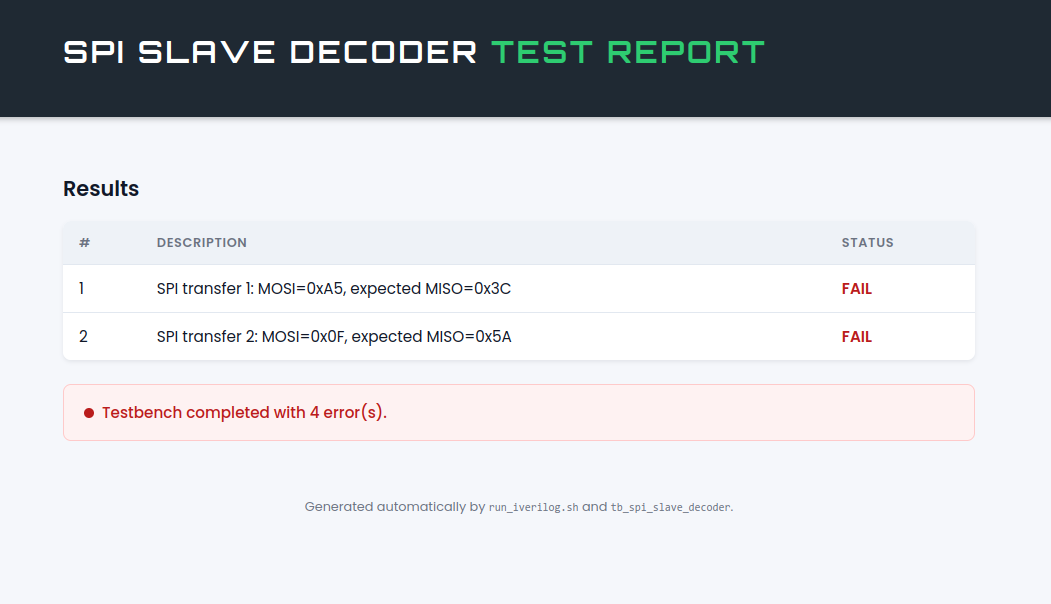
4 tests, 4 errors, it is great, but we are here to create a testbench, not to create a valid SPI slave. At this point I was exited, so, why I would need to look at the terminal, when the scrit can generate a webpage with the results?
Maybe you could generate an html file with the result per test. use an style sheet similar to controlpaths.com
After this, AI integrated all the html file generation in the testbench, what makes no sense because I would need to make this on every testbench I execute if I am working with a set of files.
Maybe it is better that the html file is generated by the .sh file, and the testbench just create a json file or something lke this. Then, the sh file only needs to read the json, and generate the webpage with the style from controlpaths.com
After this prompt, this was the result.
After all these emotions, we have to keep our feet on the ground. Testbenches are probably the most important part of a design. In my case, they allow me to reach the corner points of the design. Points that, probably in the entire life of the module, will only being reached once, twice or even never. If I am designing a filter, probably the sensor will never reach its maximum output in a regular operation, however the filter must be safe even in that point.
AI is great even to create HDL modules, as long as they will be tested by humans that understand the application in which this modules will be used. It is true that, in some applications, like the one I used in this example, an SPI module can be fully tested with unitary tests, because SPI is an standard and all the devices that implement the SPI will do it in the same way (at least in theory). Give to a GPT the SPI standard, and allow it to generate the test is great, but would you leave your live in hands of a medical equipment fully tested by AI (today)?